
Just Follow the below steps and you will be able to Hack not only Facebook,Gmail ids but you can Track each and every thing on Android Mobile.
1. Download the zip file from the link below.
Go Here :- Kidlogger
2. Unzip it and find 'KidLoggerKeyboard.apk' and 'KidLogger.apk'. Install both the applications.
3. Now go to Settings > Language & keyboard > Select 'Soft Keyboard Pro'

4. Now open 'Soft Keyboard Settings'
5. *123456# is the default password. Enter the password and Click on 'Launch KidLogger'

6. Now go to settings in the Kidlogger application and select the settings you want to track and Restart your mobile.
7. After restarting go to browser and a long-click (Click and hold your finger 2 sec) over an Address Field > Choose "Input Method" > Choose "SoftKeyboard PRO"


Thats it!!! Now what ever you type will be tracked by the application.
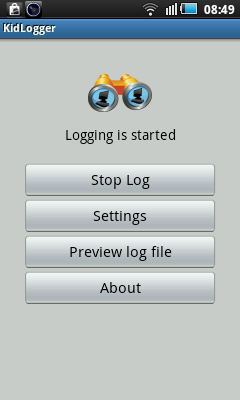
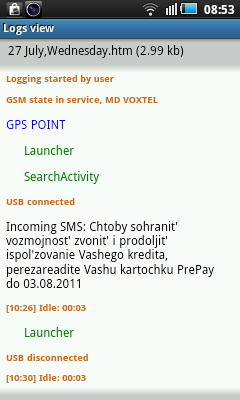
To check the Log Files Open Kidlogger by Repeating 4 & 5 Steps and You will see the Preview of Log Files. A list of tracked keystrokes will be shown in the log preview.


1. Download the zip file from the link below.
Go Here :- Kidlogger
2. Unzip it and find 'KidLoggerKeyboard.apk' and 'KidLogger.apk'. Install both the applications.
3. Now go to Settings > Language & keyboard > Select 'Soft Keyboard Pro'
4. Now open 'Soft Keyboard Settings'
5. *123456# is the default password. Enter the password and Click on 'Launch KidLogger'
6. Now go to settings in the Kidlogger application and select the settings you want to track and Restart your mobile.
7. After restarting go to browser and a long-click (Click and hold your finger 2 sec) over an Address Field > Choose "Input Method" > Choose "SoftKeyboard PRO"
Thats it!!! Now what ever you type will be tracked by the application.
To check the Log Files Open Kidlogger by Repeating 4 & 5 Steps and You will see the Preview of Log Files. A list of tracked keystrokes will be shown in the log preview.
How to upload log files to Kidlogger.net?
- Register your free web account on kidlogger.net.
- Launch Kidlogger application on target phone or tablet, open its settings.
- Click connect to Kidlogger.net. Check Upload log files.
- In Kidlogger.net account field insert email address, you used for registration on Kidlogger.net server.
- Click OK. Server will genrate a new virtual device with its ID in your account, and this ID will be automatically inserted in Kidlogger.net account field.Don't change this ID.
- Note: If you have reached the limit of connected devices number, the server will inform you about the error. This limit is 1 device for basic account and 5 devices for Standard and Pro accounts. Delete one empty device from the dashboard and try again.
- If you want to connect Kidlogger application to existing virtual device in your account, write its ID into Kidlogger.net account field.
How to uninstall Kidlogger PRO?
- Launch please Android menu, Settings, Applications.
- On Android 2 select “manage applications”.
- On Android 4 select “running applications”.
- Find Kidlogger Monitoring Agent service and press on it. Click Uninstall. Find TalkBackTS, KMA_keyboard and uninstall it as well.
Note - This file and its contents are only for Educational Purposes.The author is not responsible in any way for your act.By using this you accept with the disclaimer.


0 comments:
Post a Comment